Disclosure: This comparison is published by Labbaik. We've tried to represent e-maktab fairly using publicly available information, but we naturally know Labbaik in greater depth. If you spot something outdated, let us know.
Quick verdict
e-maktab is built around the madrasah. Labbaik is built around the organisation that runs it.
Both platforms handle the core madrasah well. Choose e-maktab if you want an established, education-focused system with mature administration, reporting and multi-branch controls.
Choose Labbaik if you want those everyday madrasah workflows inside a broader, modular platform that can also run payroll, WhatsApp, Alimiyyah, donations, events and masjid services when you need them, with a phone-first app and published pricing.
Only run a madrasah? Labbaik stays focused: your workspace only includes the tools you use. See how Labbaik adapts to your organisation →
At a glance
e-maktab gets plenty of ticks here, because it's a capable system. Where we couldn't find a feature on e-maktab's public site or help centre, we say "Not publicly advertised" rather than assume it's missing.
| Capability | Labbaik | e-maktab |
|---|---|---|
| Attendance & absence alerts | ✓ | ✓ |
| Student records & custom fields | ✓ | ✓ |
| Fee collection | ✓ Stripe cards & BACS Direct Debit, with smart retries | ✓ Stripe & Direct Debit, with automated reminders |
| How Stripe is connected | Built in: Stripe Connect, set up in a few clicks | Admins create Stripe API keys and a webhook, then paste three keys into settings, per e-maktab’s help guide |
| Parent portal | ✓ passwordless, phone-first PWA | ✓ attendance, fees and messages |
| Messaging | ✓ WhatsApp & email | ✓ strong email & SMS hub: two-way, bulk, delivery tracking |
| WhatsApp workflows | ✓ fees, payment alerts, attendance, admin | Not publicly advertised |
| Quran & Hifz progress | ✓ Qa'idah → Qur'an → Hifz, Sabak, Sabak Para & Dhor, live juz map | ✓ Sabaq assignment & Sabaq diary (surah, pages, completion); separate revision tracking not publicly advertised |
| Online applications | ✓ | ✓ |
| Incident logging | ✓ | ✓ with confidential access controls |
| Policies & acknowledgements | ✓ | ✓ policies and documents with acknowledgement tracking |
| Audit trail | ✓ | ✓ detailed: old and new values, who and when |
| Parental consent | ✓ | ✓ digital consent for trips, photos, medical care |
| Reporting | ✓ | ✓ strong: CSV/PDF exports, branch comparisons, scheduled report emails |
| Multi-branch | ✓ | ✓ branch-level separation, central oversight |
| UK payroll | ✓ PAYE, NI, pensions, payslips | Not publicly advertised |
| Alimiyyah / kitab-level tracking | ✓ kitab → section → page | Not publicly advertised |
| Donations & Sadaqah | ✓ | Not publicly advertised |
| Events & bookings | ✓ | Not publicly advertised |
| Nikah, Shahada & ijazah certificates | ✓ | Not publicly advertised |
| Online classes (Zoom, cloud recordings) | ✓ auto alerts and attendance | Not publicly advertised |
| Built-in video classes (no Zoom account needed) | ✓ Labbaik Live: private rooms, attendance on join, 0.35p per person, per minute | Not publicly advertised |
| Masjid, madrasah & charity workspaces | ✓ modular, only the tools you need | Education-focused |
| Phone experience | Phone-first PWA, installs to the home screen | The desktop dashboard, resized for smaller screens; no app |
| Pricing | Published: free Safar plan, fee only on card payments collected | Prices not publicly displayed; contact or demo required |
| Free plan | ✓ Safar, no card, no expiry | No permanent free plan publicly documented |
| Getting started | Self-serve in about 10 minutes | Book a demo or call |
"Not publicly advertised" means e-maktab's public site doesn't mention the feature, not that it definitely doesn't exist. Check directly with their team if it's a dealbreaker either way.
Where each one shines
Where e-maktab shines
- Mature administration — student records, custom fields, consent, documents, policies, incidents and a detailed audit trail.
- Strong reporting — CSV/PDF exports for governors and trustees, branch comparisons and scheduled weekly or monthly report emails.
- Communications hub — email and SMS, two-way conversations, bulk messaging and delivery tracking.
- Fee collection — Stripe and Direct Debit, which its reviewers single out.
- Multi-branch management — branch-level separation with central oversight.
- Established UK track record — years of use by UK madrasahs, with strong Trustpilot reviews.
Where Labbaik shines
- Built around the whole organisation — masjid, madrasah, small maktab or charity, each with a focused workspace; tools you don't use stay hidden.
- WhatsApp-first operations — reminders, payment alerts, attendance and admin on the channel parents actually open.
- Dedicated Islamic curriculum — Qa'idah to Hifz with Sabak, Sabak Para and Dhor, and Alimiyyah kitab by kitab.
- Payroll included — PAYE, NI, pensions and payslips, with flexible pay calculations.
- A genuinely phone-first app — built for teachers on the classroom floor and parents on the school run.
- Public pricing and self-serve entry — free to start, no demo needed to see the cost.
Already using e-maktab?
You don't have to start again.
Hijrah by Labbaik reads e-maktab exports and moves your students, families, classes and payment history across, keeping them linked together. Anything unclear is flagged for you to check, and nothing is imported until you approve it. It's free.
Phone-first vs a resized dashboard
e-maktab describes itself as fully responsive across desktop, tablet and phone. In practice that's its desktop dashboard resized for a smaller screen, with no app to install. That suits an administrator working from an office.
Labbaik is designed the other way round: attendance and Hifz logging happen on a teacher's phone as the class runs, the parent portal installs to the home screen like an app, and admins still get a clean web dashboard for back-office work that benefits from a bigger screen.
Dashboard, side by side
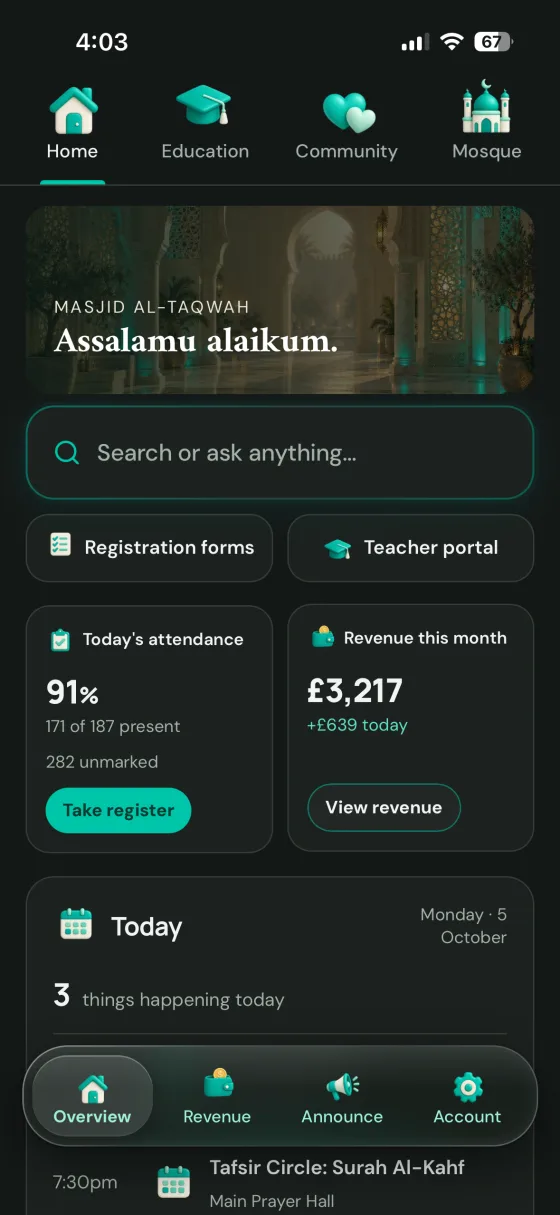
e-maktab describes its system as "intuitive, easy to learn and navigate." Here's its own demo dashboard next to the app dashboard shown on Labbaik's homepage, both as they looked in September 2026, so you can judge for yourself.
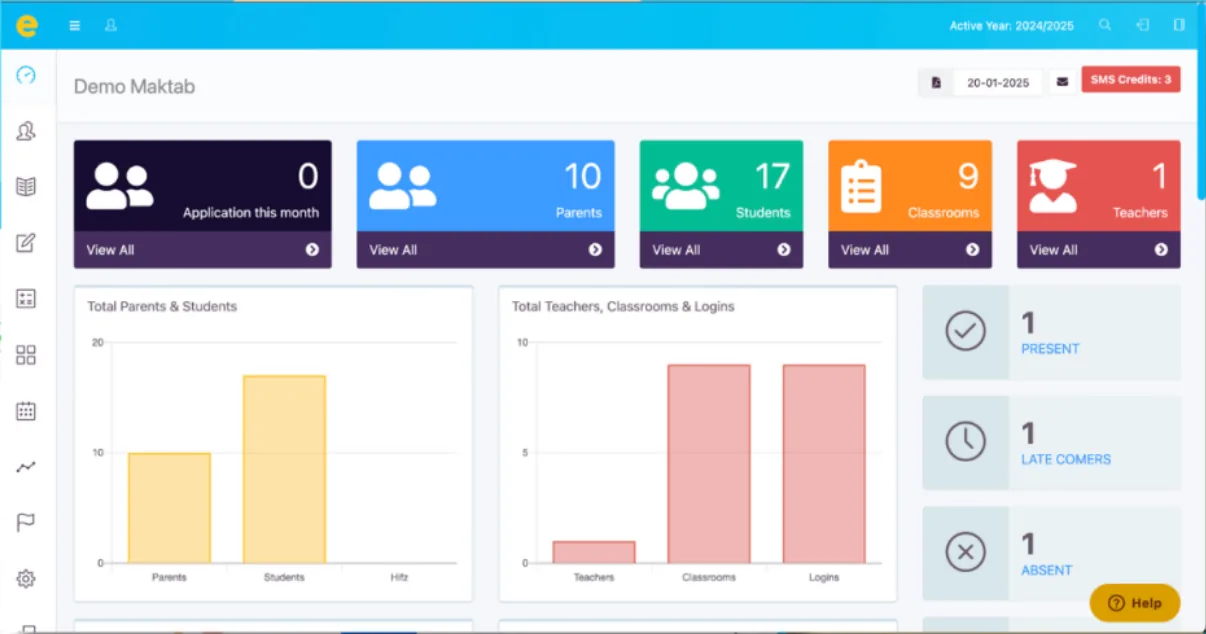
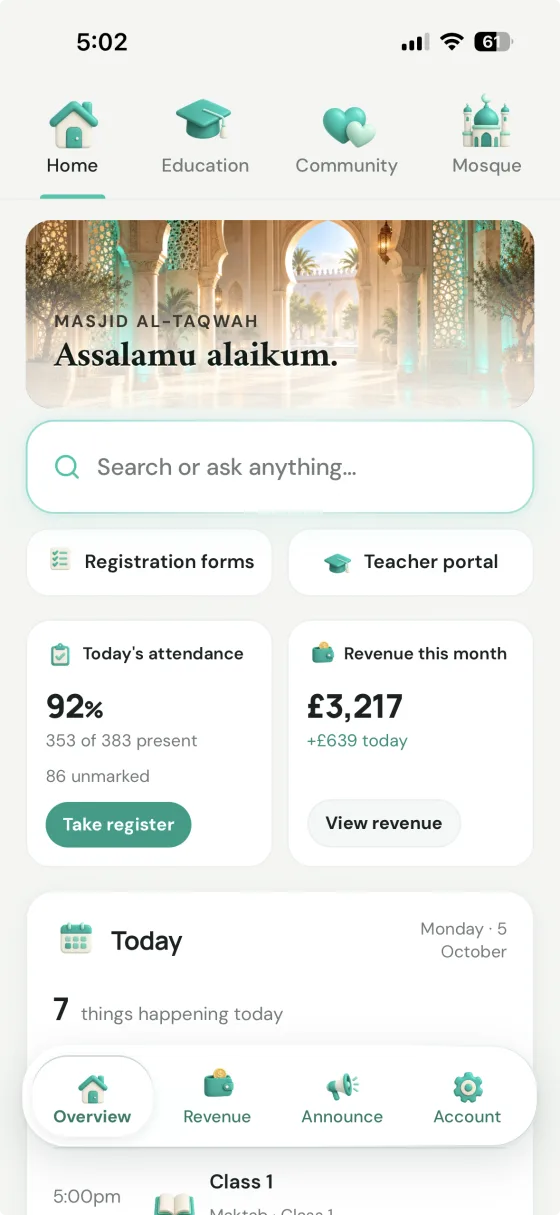
e-maktab: a sidebar-driven admin dashboard with stat tiles, charts and list views, built for a back-office screen. It's a genuinely functional layout for the administrator it's aimed at.
Labbaik: the same kind of overview, designed for the phone in an admin's or teacher's pocket.
More than a madrasah tool, without the bloat
e-maktab is a comprehensive administration system for the maktab: students, fees, parents, communications, documents, incidents and branches. Labbaik covers that same ground, then, if the same organisation also runs a masjid, Alimiyyah, donations, community events, certificates or payroll, you don't need another system.
Only run a madrasah? You won't see the rest. Labbaik adapts to the organisation you run, and you can add or remove tools whenever you need them, without contacting us.See how Labbaik adapts to your organisation →
| Masjid & community tools | Labbaik | e-maktab |
|---|---|---|
| Sadaqah & Zakat donations | One-tap giving, campaigns, recurring donations, full reporting | Not publicly advertised |
| Community events | Publish, sell tickets, take RSVPs, manage capacity | Not publicly advertised |
| Bookings & class capacity | Included for events and non-educational classes | Not publicly advertised |
| Nikah & Shahada certificates | Verifiable, institution-branded | Not publicly advertised |
| Non-educational community classes | Same registration & payment tools as the maktab | Not publicly advertised |
| Recurring compliance & admin tasks | WhatsApp alerts for renewals & overdue deadlines | Not publicly advertised |
Quran, Hifz and Alimiyyah
e-maktab has real Quran tooling: teachers assign Sabaqs (surah, pages and completion) to a class or selected students, and a Sabaq diary tracks them. Labbaik goes further on structure: students move through Qa'idah, Qur'an and Hifz levels, Sabak, Sabak Para and Dhor are logged separately with a live juz map, and Alimiyyah programmes can upload their own PDF syllabus (Bahishti Zewar, Zad ut-Talibeen, Mishkat, Hidayah and more) to track kitab by kitab and page by page, live in the parent and student portal.
| Quran & Islamic studies | Labbaik | e-maktab |
|---|---|---|
| Sabaq assignment | ✓ | ✓ surah, pages and completion |
| Separate Sabak Para & Dhor revision | ✓ with a live juz map | Not publicly advertised |
| Qa'idah → Qur'an → Hifz levels | ✓ students move up automatically | Not publicly advertised |
| Custom syllabus import | Upload your own PDF — auto-split into sections | Not publicly advertised |
| Kitab tracking granularity | Kitab → section → page | Not publicly advertised |
| Alimah/Aalim completion certificates | Verifiable, institution-branded, print-ready | Not publicly advertised |
Stripe setup: Labbaik vs e-maktab
e-maktab collects fees through Stripe, and its reviewers rate it. Getting it switched on is the hard part. Its own help guide is written for a tech-savvy admin: API keys and a webhook built by hand in Stripe’s developer settings, where one missed event or mistyped URL can stop payments being recorded. With Labbaik, anyone on the committee can connect Stripe in a few clicks.
Labbaik
Anyone can do it- Click Connect Stripe in Labbaik
- Sign in to Stripe, or create an account
- Confirm your organisation and bank details on Stripe’s secure pages
- You’re back in Labbaik, ready to collect fees
- No API keys
- No webhooks
- No developer settings
e-maktab
Needs a tech-savvy admin- In Stripe, turn on Bacs Direct Debit as a payment method
- Open Developers → API keys and copy the publishable key
- Create a secret key: choose “powering an integration you built”, verify, name it and copy itStripe only shows it once.
- Open Developers → Webhooks and add a destination
- Tick 12 events by hand
charge.dispute.createdcharge.failedcharge.refundedcharge.succeededcheckout.session.completedcustomer.deletedmandate.updatedpayment_method.automatically_updatedpayment_method.attachedpayment_method.detachedpayment_intent.createdsetup_intent.succeeded - Choose Webhook endpoint and type in your e-maktab address
https://{subdomain}.e-maktab.co.uk/webhooks/stripe - Reveal the webhook’s signing secret and copy it
- In e-maktab, open Settings → Stripe
- Paste in the publishable key, the secret key and the webhook key
- API keys
- A secret key
- Webhooks
- Developer settings
Steps from e-maktab’s Stripe help guide, checked October 2026.
It also means creating a secret key with full access to your organisation’s Stripe account and handing it to another company’s software, where it keeps working until someone thinks to replace it. Labbaik connects through Stripe Connect instead, so there are no keys to copy or keep safe, and cards, Apple Pay, Google Pay, Onelink and BACS Direct Debit all run through the same Stripe account.
See how Labbaik fee collection works →
Pricing
Labbaik publishes pricing openly: Safar is free, with a platform fee from 1.5% only on card payments collected through Stripe. If a madrasah collects nothing by card in a month, it pays Labbaik nothing. No per-student fees, setup charge or contract, and no ads.
e-maktab describes its pricing as affordable and tailored to maktabs, but doesn't show prices publicly, so you'll need to email or book a demo to find out what you'll pay.
Committee admin and online classes
Labbaik sets up recurring committee tasks (insurance and utility renewals, servicing, Charity Commission deadlines, DBS renewals, fire safety checks) with an owner and a due date, and sends WhatsApp alerts as they approach and if the most important ones go overdue. For online classes, it has its own built-in video, Labbaik Live(0.35p per person, per minute), where attendance is marked as students join. It also connects your own Zoom account, alerts students by WhatsApp and email when a class starts, marks attendance when they join from the portal, and publishes recordings from your own Google Drive or Dropbox. Neither is publicly advertised by e-maktab.
Frequently asked questions
Is e-maktab better than Labbaik?
They're both capable; it depends on your organisation. e-maktab is an established, education-focused system with mature administration, strong reporting, a communications hub and multi-branch controls. Labbaik covers the same everyday madrasah ground and adds WhatsApp workflows, payroll, dedicated Hifz and Alimiyyah tracking, donations, events and certificates, in a modular, phone-first platform with published pricing and a free plan.
Does e-maktab support Hifz tracking?
Yes, at the Sabaq level: teachers assign Sabaqs (surah, pages, completion) and a Sabaq diary tracks them. Separate Sabak Para and Dhor revision tracking isn't publicly advertised. Labbaik logs Sabak, Sabak Para and Dhor separately with a live juz map, moves students from Qa'idah to Qur'an to Hifz, and tracks Alimiyyah kitab by kitab.
Does e-maktab have policies, audit trails and consent forms?
Yes. e-maktab advertises policies and documents with acknowledgement tracking, digital parental consent, and a detailed audit log showing old and new values, who made each change and when. Labbaik also has policies with acknowledgements and an audit trail.
Does e-maktab support WhatsApp?
Not publicly advertised. e-maktab's communications hub covers email and SMS, with two-way conversations, bulk messaging and delivery tracking. Labbaik runs fee reminders, payment set-up and failure alerts, attendance and admin through WhatsApp.
Is e-maktab mobile-friendly?
e-maktab says it's fully responsive across desktop, tablet and phone; in practice it's the desktop dashboard resized for smaller screens, with no app. Labbaik is designed phone-first as an installable PWA, built around teachers taking registers and logging Hifz from the classroom floor.
How much does e-maktab cost?
e-maktab doesn't show prices publicly; you'll need to email or book a demo. Labbaik's Safar plan is £0 a month with no student cap, and charges a platform fee only on card payments collected, from 1.5%.
How do you connect Stripe to e-maktab?
With API keys and a webhook. e-maktab's help guide has admins go into Stripe's developer settings, copy the publishable key, create a secret key, set up a webhook listening for 12 specific events, copy its signing secret, and paste all three keys into e-maktab's settings. Labbaik uses Stripe Connect instead: sign in to Stripe, approve the connection, and you're ready to collect, with no keys or webhooks to set up.
Do I need to give Labbaik my Stripe API keys?
No, never. Some madrasah systems still ask admins to dig secret API keys out of Stripe's developer settings and paste them into the software. It's a technical job that many admins find confusing, and plenty give up before they ever take a payment. It isn't a secure way to connect either. A secret key gives full access to your organisation's Stripe account, it's easily passed around in an email or a WhatsApp message, and it keeps working until someone thinks to replace it. Stripe Connect is Stripe's own way to link software to your account: you sign in to Stripe, approve the connection, and there are no keys to copy, paste or keep safe.
Will donations and Nikah tools clutter our madrasah?
No. Labbaik adapts to the organisation you run, so a madrasah's workspace only includes the tools a madrasah uses. Add or remove tools whenever you need them, without contacting us. See how the platform works.
Does Labbaik include payroll?
Yes. Labbaik runs HMRC-compatible UK payroll on every plan: PAYE, National Insurance, pension and student loan deductions calculated automatically, with payslips and P45/P60 generation included. Payroll isn't publicly advertised by e-maktab.
Can I move from e-maktab to Labbaik?
Yes, and it's free. Hijrah by Labbaik reads e-maktab exports and moves your students, families, classes and payment history across, keeping them linked and flagging anything unclear for you to check before it imports. See how Hijrah works.
We compared Labbaik and e-maktab using publicly available product information as of October 2026. Where possible, we checked the pages below directly rather than relying on secondhand summaries. Feature availability and pricing can change — the source is the most up-to-date word on either platform.
Weighing up more than one option? See our full round-up of the best e-maktab alternatives for UK madrasahs, or see why Labbaik is a free, modern alternative to e-maktab.
Labbaik isn't only maktab and madrasah software — the same platform also runs donations, community certificates, events and non-educational classes, so a masjid can run its whole community on one system. It adapts to the organisation you run, so a madrasah or maktab only sees the tools it uses. See how Labbaik adapts to your organisation →
Parents and students sign in with a magic link sent to their email, with Google, or with a code sent on WhatsApp to the number the madrasah has for them. Admins and teachers sign in with a magic link, Google or a passkey, which uses their phone or computer's face, fingerprint or screen lock. Nobody has a password to set, forget or reset. Tour the parent portal →
Send us whatever you're using today — a spreadsheet, e-Maktab, IBEAMS, IlmFlow, or a folder of paper registers. We'll set Labbaik up for you and migrate every student, family, class and fee balance across ourselves, at no cost.
If your committee isn't ready to take its first register yet, that's fine too — we'll finish the whole setup so it's ready the moment you are. Get in touch and tell us what you're moving from.
Compare Labbaik with another platform
See how Labbaik stacks up against more of the alternatives UK maktabs and madrasas evaluate.