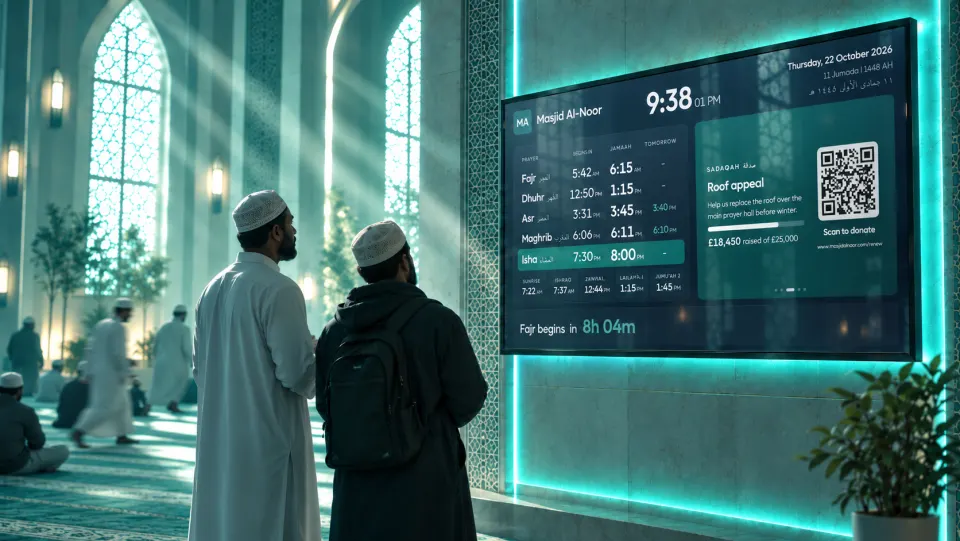
Your masjid's prayer times, on every screen.
A full-screen prayer board for the masjid TV, run from the same timetable as your website. Jamaah times, the iqamah call and adhkar, alongside your sign-ups and appeals. Free, with no hardware to buy.
Trusted by 75+ masajid & madrasahs
Organisations using Labbaik include Al-Bokhari Centre, Al Huda Academy, Ashrafia Madrasah Blackburn, Central Mosque Blackpool, Land of Knowledge, Jamia Islamia Ghausia Masjid, Lincoln Central Mosque & Cultural Centre, Madina Masjid Rochdale, Masjid Irshad, Ummah Masjid, Zakariyya Masjid.










- £0per screen, no subscription
- 4 looksincluding Vertical
- 31 dayswithout internet
- Any TVwith a web browser
Try the prayer board. Jump to any moment.
The real board on sample times. Switch looks, change the colour, and jump to Zawwal, the iqamah or Jumu'ah.
Sample times for a demo masjid, running on the real board. Yours shows your own timetable, announcements and appeals. Open full screen
- Vertical look for upright screens
- Up to 31 days without internet
- Phones-off screen
- Jumu'ah bayaan time
- Logo size
- Screen timings
- Version history
Everything a masjid screen needs, and nothing to maintain.
Change a jamaah time or post an announcement in Labbaik, and every screen updates within ten minutes.
Prayer times
- Begins and jamaahSide by side, with tomorrow's changes
- Next prayer countdownThe current prayer highlighted
- Sunrise, Ishraq and Zawwal"Do not pray" warnings, timed to the second
Around each salah
- Phones offA dark screen asking for silence
- Iqamah countdownThen the call and "straighten the rows"
- Adhkar after salahArabic and English, longer ones stay up longer
Every season
- Jumu'ahUp to three jamaah times, with the bayaan time
- RamadanSuhoor, Iftar and Taraweeh
- Hijri dateAdjusted to your moon sighting
Your community
- Class and event sign-upsA QR code to register, with places left
- Donation appealsLive totals and a QR code to give
- Notices and postersBeside the times, or now and then over them
Make it yours, down to the second.
Every setting has a live preview, so you see exactly what the screen will show before you save.
- Four looksClassic, Countdown, Showcase and Vertical, per screen if you like.
- Your brandingLogo and its size, your name, your colour, and a plain, coloured or picture background.
- What showsBegins times, tomorrow's changes, Arabic names, seconds, the Hijri date and the Sunrise to Jumu'ah row.
- Screen timingsHow long the phones-off, countdown, iqamah, rows and adhkar screens stay up.
- Day and nightSwitch at sunrise and Maghrib, or keep it always day or always night.
- Version historyEvery change kept with who and when. Put back any earlier setup in a tap.
Internet down? The board carries on.
Each screen saves your next 31 days of prayer times, so it keeps showing the right times for up to a month without internet. A small dot in the corner tells you when it hasn't been able to connect for a day.
Scan, sign up, give. Straight from the screen.
Class and event registrations and donation appeals take their turn on the board, each with a QR code anyone can scan with their phone camera. No app to install.
- 1Post it in Labbaik
Link an announcement to a class or event taking sign-ups, or turn on your appeals for the board.
- 2It shows on every screen
With a QR code, the places left for events, and the amount raised for appeals.
- 3People scan it
The form or appeal opens on their phone. Fully booked events drop their QR code by themselves.
Up and running in minutes.
- 1
Add your prayer times
Calculate them for your location, import your timetable, or bring them in from Masjid 24/7. Then set your jamaah times.
- 2
Choose a look
Classic, Countdown, Showcase or Vertical, then your logo, colours and screen timings.
- 3
Open your link on the TV
Copy your board link, open it in the screen's browser and go full screen. It looks after itself from there.


Already on Masjid 24/7? Bring your times with you.
Find your masjid on Masjid 24/7 when you set up prayer times, check a week of times and link it. Your published prayer and jamaah times come straight into Labbaik and stay in sync by themselves, so your board, website and timetable always match. The board credits Masjid 24/7 on screen.
Visit masjid247.com ↗Questions & answers
The prayer board, answered.
Is the prayer board really free?
Yes. The prayer board is included free with Labbaik, including on the free Safar plan. There's no subscription, no charge per screen and no player box to buy.
What is a masjid prayer times display?
A screen in the masjid, usually a TV in the prayer hall or entrance, that shows the day's begins and jamaah times, a countdown to the next prayer and the masjid's notices. Labbaik's prayer board runs one from your own timetable, so it's always right without anyone updating it by hand.
What do I need to run it?
A screen with a web browser. A mini PC, a Fire TV stick with the Silk browser, a Chromecast with Google TV or a smart TV's own browser all work. Open your board link, go full screen and leave it running. It keeps the screen awake where the browser allows it.
Where do the prayer times come from?
Your own timetable in Labbaik. When you set up prayer times you can calculate them for your location, import your existing timetable, or use Masjid 24/7. Jamaah times are yours to set, and the board picks up any change on its own within ten minutes.
Can we import our prayer times from Masjid 24/7?
Yes, if your masjid is in the UK and listed on Masjid 24/7. Find your masjid when you set up prayer times in Labbaik, check a week of times, and link it. Your published times come straight in and stay in sync by themselves, and the board credits Masjid 24/7 on screen.
Visit masjid247.com ↗How does the board work out Zawwal?
Zawwal is taken as the midpoint between sunrise and Maghrib. The board shows a "Do not pray" warning for five minutes either side of it, and from sunrise until Ishraq, 15 minutes after sunrise, with a countdown to when it's clear.
What happens on screen at iqamah?
Just before the jamaah, the screen asks everyone to switch off their phones, then a countdown runs to the iqamah. Then it shows the iqamah call and reminders to stand shoulder to shoulder and straighten the rows. During the salah it goes dark, showing only a dim clock, and after the salah it shows the adhkar, with longer ones staying up longer. You can set how long each screen shows, or turn any of it off.
Can the board show class and event registrations?
Yes. Post an announcement in Labbaik and link it to a class or event that's taking sign-ups. The board shows it with a QR code, so anyone in the masjid can scan it with their phone camera and register on the spot, with no app to download. Events show how many places are left, and once an event is fully booked the QR code comes off.
Can it show our donation appeals?
Yes. Your live sadaqah appeals rotate between your announcements, showing how much has been raised against the target, with a QR code that opens the appeal on the donor's phone. Zakat-eligible appeals are labelled, and the totals refresh every five minutes.
Where do we post what goes on the board?
In Labbaik, the same app you use for your classes, events and donations. Posters and notices go in Announcements, where you choose whether each one shows on the board, your website or both, and give it an end date so it takes itself down. There's no separate signage software and nothing to copy onto a USB stick.
Does it handle Jumu'ah and Ramadan?
Yes. On Fridays Jumu'ah replaces Dhuhr, with up to three jamaah times, and you can show when the bayaan starts before each one. In Ramadan the board switches to Suhoor and Iftar times, with an optional Taraweeh time. It follows the Hijri calendar automatically, or you can turn Ramadan mode on or off yourself.
Can we change how it looks?
Yes, almost all of it. Pick one of four looks: Classic, Countdown, Showcase or Vertical. Then choose your logo and how big it is, your name, a day or night theme (or let it switch at sunrise and Maghrib), a plain, coloured or picture background, and which details show, such as begins times, tomorrow's changes, Arabic names and seconds. You can also set how long each screen before and after salah stays up. Everything previews live before you save, and different screens can show different looks from the same timetable.
Does it work on a screen standing upright?
Yes. The Vertical look is made for portrait screens, with the times at the top and your announcements below. If your TV stick can't turn the picture itself, as on most Fire TV sticks and smart TVs, choose Turn right or Turn left when you copy the link and the board turns itself.
Can we undo a change to the board?
Yes. Every change to the board's look and settings is kept in its version history, with who made it and when. Pick an earlier version to preview it and put it back in one tap.
What if the internet goes down?
The board carries on by itself. Each screen saves your next 31 days of prayer times, so it keeps showing the right times for up to a month without internet, as long as your timetable is published that far ahead. If it can't reach Labbaik for 24 hours, a small dot appears in the corner so you know to check the connection.
Can we adjust the Hijri date?
Yes. Move the Hijri date a day or two either way to match your local moon sighting. If you import a timetable with its own Hijri dates, the board uses those.
Do the same prayer times show on our website?
Yes. The board and your website both read the same prayer times in Labbaik. Change a jamaah time once and it's right everywhere.
Can we use it on more than one screen?
Yes. Open the same link on as many screens as you like, in the prayer hall, the sisters' area, the entrance or the madrasah. They all update together.
More questions? See the full FAQ or get in touch.